Track Form Engagement With Google Tag Manager

(Updated 13 August 2017)

A little over a year ago, in April 2014, I wrote the post “Advanced Form Tracking In Google Tag Manager”, and it’s been at the top of my best seller list ever since. Turns out that many people are rightfully passionate about making the web forms on their websites as fluid and intuitive as possible, since a web form is often the only thing that stands between a prospect and their transformation into clienthood.

Read More…

Track Form Engagement With Google Tag Manager

(Updated 13 August 2017)

A little over a year ago, in April 2014, I wrote the post “Advanced Form Tracking In Google Tag Manager”, and it’s been at the top of my best seller list ever since. Turns out that many people are rightfully passionate about making the web forms on their websites as fluid and intuitive as possible, since a web form is often the only thing that stands between a prospect and their transformation into clienthood.

Read More…

Understanding Tag Sequencing in Google Tag Manager

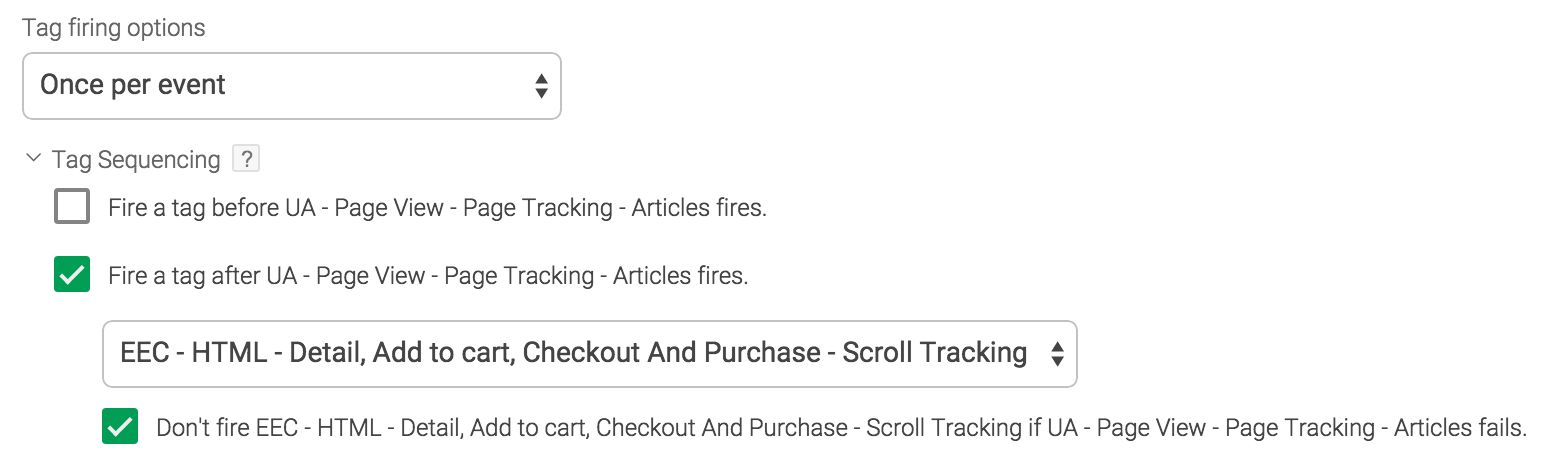
A recent update to Google Tag Manager introduced a feature which has been on the wishlist of many users for a long time. It’s called Tag sequencing, and its purpose is to facilitate the sequential firing of Tags. The idea is that you can specify a setup and a cleanup for each Tag in your container.

This article is intended to function as a quick tour of the feature. It’s not the simplest feature to understand, as Tag sequencing runs parallel but separate from the normal flow of your container. Don’t worry, I’ll get back to this soon.

Read More…

Two Ways to Persist Data via Google Tag Manager

The web is stateless. It’s basically blind to your past, and it does a poor job of predicting what you might do in the future. When you browse to a website, the browser requests the page from the web server, and then proceeds to render it for you. This is a detached, clinical process, and any personalized or stateful data transfer is left to the sophistication of your web server.

Read More…

#GTMTips: Product-Scoped Custom Dimensions and Metrics

With the advent of Enhanced Ecommerce for Universal Analytics, a new scope was introduced for Custom Dimensions and Metrics. Product scope can be used to send information about each product that is sent through Enhanced Ecommerce, but it’s not exactly the most logical or intuitive thing to wrap your head around.

In this #GTMTips post, we’ll take a look at how to implement Product-Scoped Custom definitions via Google Tag Manager, and I’ll quickly explain how they work in relation to queries and reports you might want to build on top of them.

Read More…

#GTMTips: Block Your Tags With Trigger Exceptions

To prevent a Tag from firing in Google Tag Manager, you can:

  1. Delete the Tag

  2. Remove all Triggers from the Tag

  3. Add an Exception Trigger to the Tag

The third option is usually the best if the blocking is just temporary. Exceptions are what used to be called blocking rules in the first version of GTM. To add them is easy enough. In the Fire On step of Tag creation, you can click Create Exceptions, and choose the Trigger that will block this Tag from firing.

Read More…

Form Field Timing With Google Tag Manager

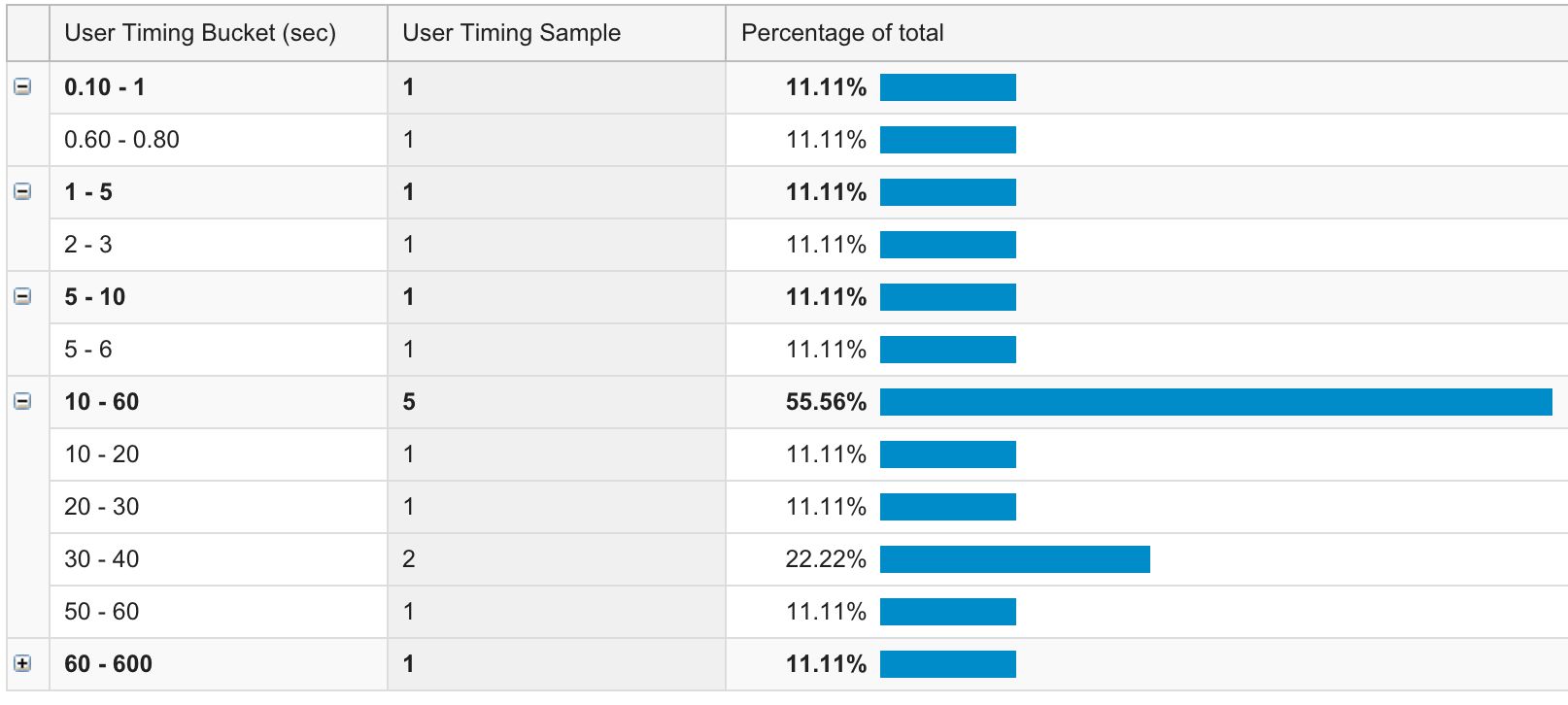
The inimitable Craig Sullivan gave me an idea for a continuation to my latest post on form abandonment tracking. In this short tutorial, I’ll show you how to track the time users spend on your form fields. We’re going to use the User Timings hit type, and we’ll send the data for just one form. With small modifications, you can expand the script to cover multiple forms on a page.

This simple solution tracks the time the user spends on each form field by measuring the distance between the focus event and the blur or change event. The first one occurs when a form field is entered, and the latter depends on if a value changed (change) or no change was registered (blur).

Read More…

Track Form Abandonment With Google Tag Manager

Form abandonment isn’t always easy to define. Most often, it refers to when someone starts to fill in an HTML form, but leaves the page without submitting it. As a definition, this works nicely. However, with multi-page forms it naturally refers only to the last page of the form. Also, especially with government institutions, forms can be saved to be submitted later. Here, again, form abandonment must be reconsidered.

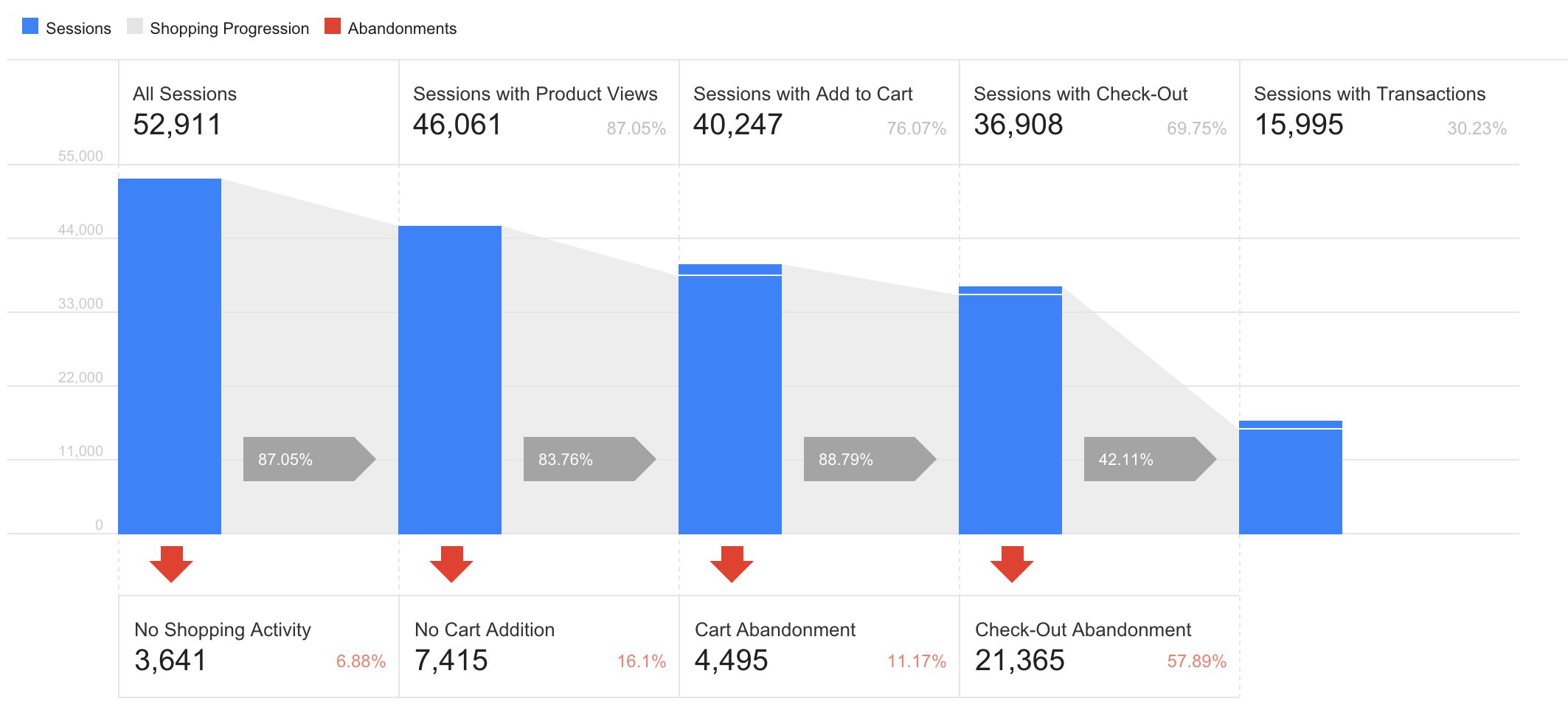
In this article, I’ll go over four different ways to track form abandonment in Google Analytics, using Google Tag Manager to setup the tracking. The definition I’ll use is the first one: abandonment occurs when someone enters a form page, but leaves it without submitting the form. Do note that GA might not be the right tool to actually track issues with your form. There are dedicated resources for that, such as ClickTale or Hotjar. But if you want to measure form engagement as part of a more coherent visitor journey, then it might make sense to track this engagement (or lack thereof) in Google Analytics.

Read More…

#GTMTips: Access Array Members in the Data Layer

In JavaScript, if you want to access an Array member, you use square bracket notation to retrieve the value stored at a specific index. Indices are numbered in order, with the first index always being at location zero (0). This means that to get the first value stored in Array simo, you’d use something like:

var firstValue = simo[0];

In Google Tag Manager, you can push Arrays into the Data Layer. However, the Data Layer Variable type, which you use to retrieve values stored in the Data Layer, does not support the aforementioned square bracket notation in its fields. Instead, you need to use a special, proprietary format to access Array members.

Read More…

#GTMTips: Implement Referral Exclusions via GTM

Maintaining the list of Referral Exclusions in Google Analytics admin is a pain. Especially if you have a webstore, the number of referral sources you need to exclude to avoid sessions being split can grow really fast. Also, it’s not like the list is has the most intuitive UI. Instead of a handy text area where you could just copy-paste stuff, you’re left with a horrible line-by-line list, and there’s no way of copying lists across properties or anything useful like that.

Read More…

Folders and Syntax Highlighting in Google Tag Manager

What a nice way to wake up to a new day, when brand-spanking new features have been released for Google Tag Manager.

The two features I want to introduce here are Folders in the UI, and code syntax highlighting in Custom HTML Tags and Custom JavaScript Variables.

Folders

Folders is one of those features that has been requested for over and over again since day one. The UI clutter in GTM is a serious problem, especially when dealing with dozens and dozens of items in a single view. With folders, you can logically categorize individual items, so it should dramatically reduce clutter. That is, once the feature is more refined.

Read More…